 Log In to your licensing account



Kia Ora!
Thank you for choosing DDBook Cloud. We would like to take this opportunity to warmly welcome you and your team aboard!
Login details & API tokens were sent via email during your license creation. If you haven't seen that email yet, please check for an email from support@modeus.com.au.

Getting Started user guide
Dive into our Getting Started guide to kick off your journey! Once you've logged into DDBook, you can access our in-app Help Library (look for the ? at the upper right side of the page). The Getting Started video walks you through the essential steps to get started. .
/Access%20DDBook%20Cloud%20Knowledge%20Base.gif?width=1444&name=Access%20DDBook%20Cloud%20Knowledge%20Base.gif)
Start with these Essential Steps
Use this checklist of essential steps to get you started, follow each step to make sure your system is configured correctly from day one.
Underlined items link to step-by-step visual guides.
-
 Check you can login successfully to DDBook via the reCare AppBar
  Enter the integration start date in the reCare AppBar: "Start DDBook from"
 Administrator set up (this is usually the Owner or Pharmacist in Charge)
 User set up (please note the admin user also needs a user role created)
 Initial stock balance entered (this involves a physical stock check)
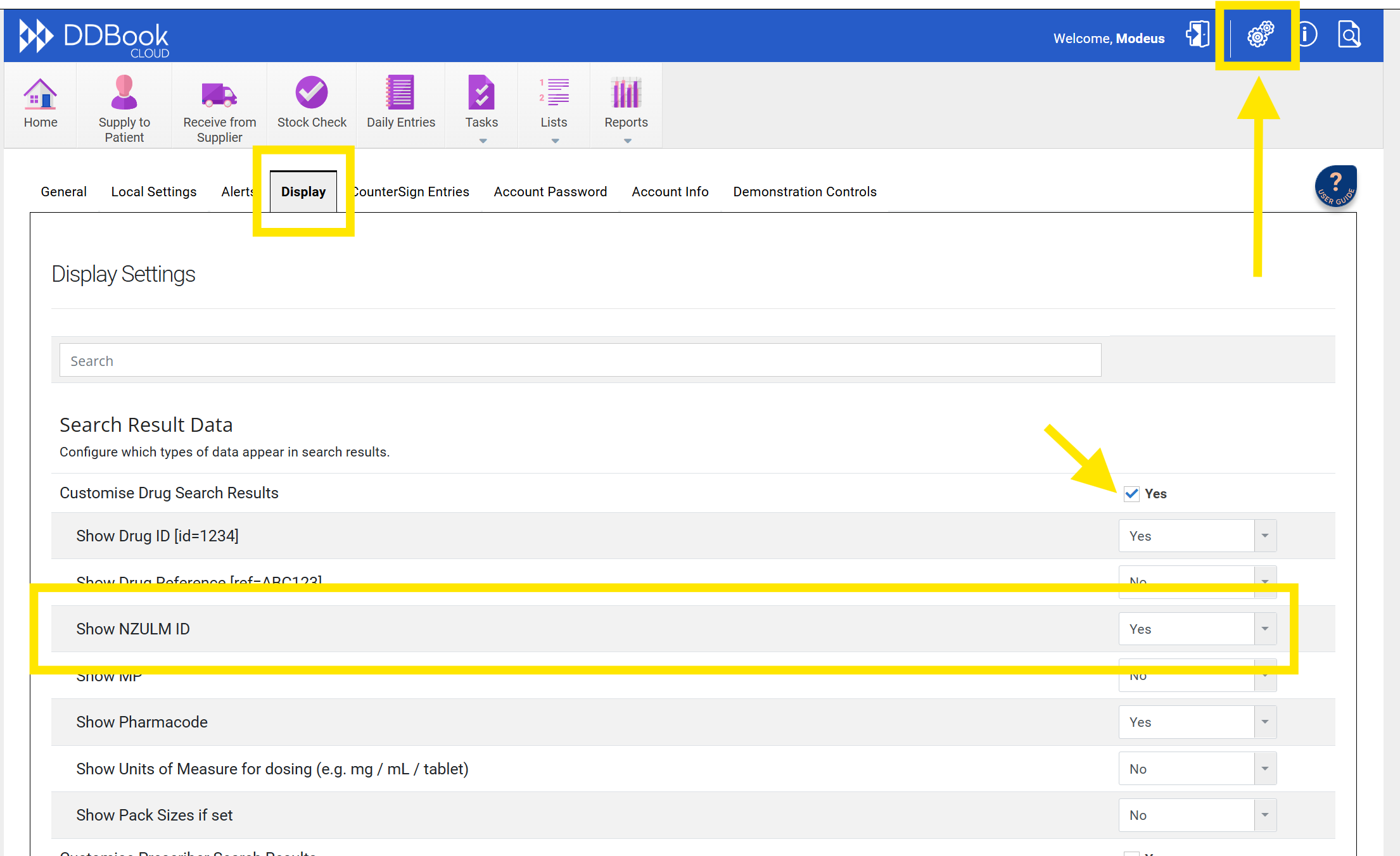
Set Drug Search to show NZULM ID
- Navigate to DDBook Cloud > Options > Display.
- Tick Customise Drug Search Results.
- In the drop-down for Show NZULM ID, select Yes.
- Ensure this is signed off by the person set up as the administrator.
- Screenshot below of the above actions below
Need Help?
You can access the help library at any time in DDBook Cloud by clicking on the ? icon.
